How to Use Utter for Free
Set up free voice-to-text with Deepgram credits and free AI post-processing with OpenRouter.
You can run Utter with your own API keys and keep costs near zero:
- Free transcription credits from Deepgram
- Free AI post-processing through OpenRouter’s free model tier
Part 1: Free Voice-To-Text With Deepgram
1. Create a Deepgram account
Go to deepgram.com and create a free account.
2. Create an API key
In your Deepgram dashboard, open API Keys and create a new key.


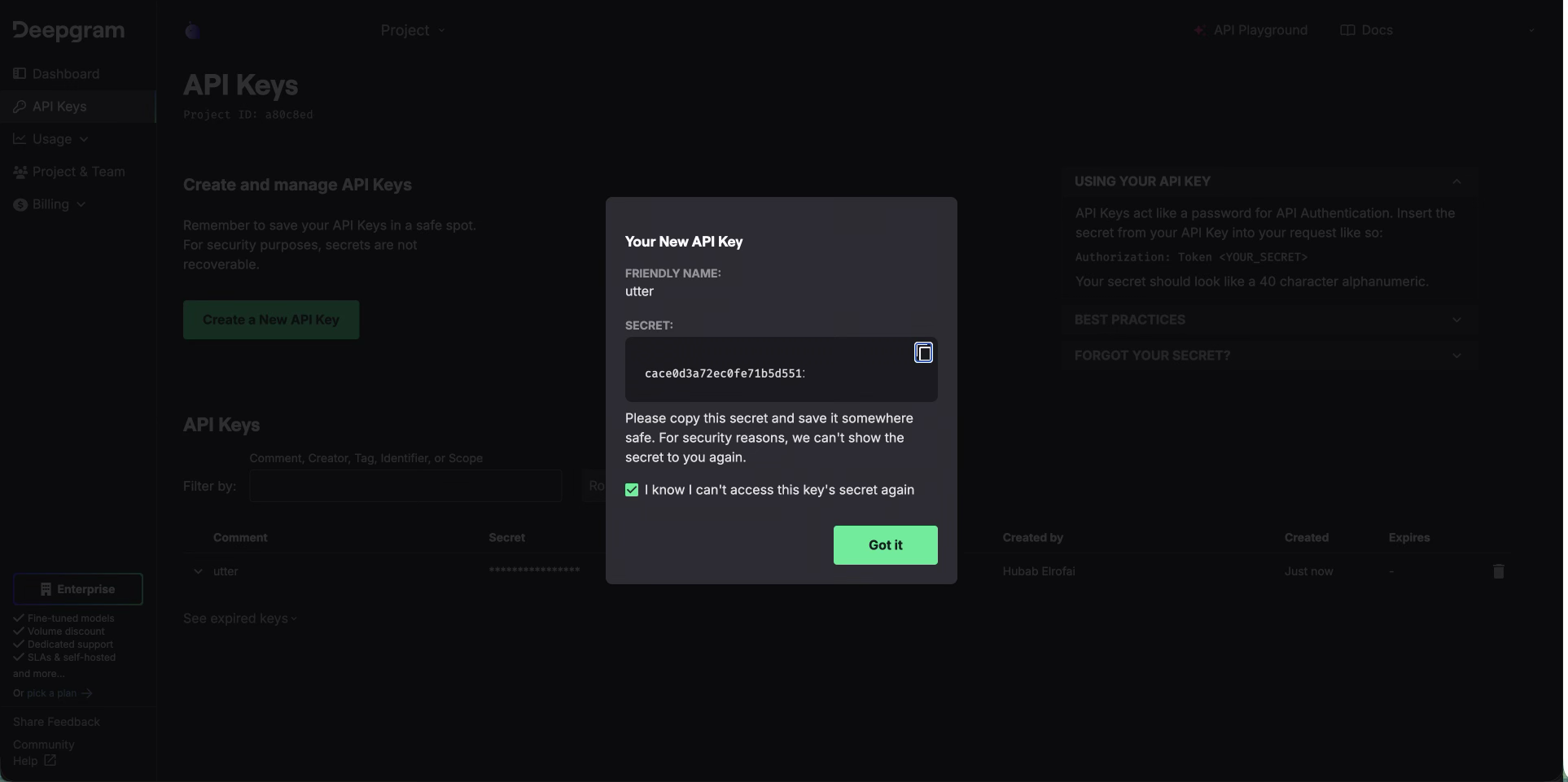
Save the key before closing the dialog.
3. Configure Utter
In Utter, go to Settings > Advanced > Voice Models:
- Provider:
Deepgram - API key: paste your key
- Model:
nova-3-general
Part 2: Free AI Post-Processing With OpenRouter
4. Create OpenRouter API key
Go to openrouter.ai, create an API key, and copy it.


5. Enable free models
Enable OpenRouter free model access in privacy/settings.

6. Add key in Utter AI settings
In Utter, open Settings > Advanced > AI Models:
- Provider:
OpenRouter - API key: paste your key
- Model: pick a free model
You are done. Utter will use your own APIs for both transcription and AI cleanup.