

If you enable Group by Mode, Utter saves each mode in its own folder.
Set Up Auto-Export
1
Open Local Files Settings
Go to Settings → General → Local Files.
2
Turn On Auto-Export
Turn on Automatically export transcriptions.
3
Choose Export Location
Click Export location and choose a folder.
4
Choose File Type
In Local Files, click Export format.
Select Markdown (.md) or Plain Text (.txt).
5
Optional: Organize by Mode
Enable Group by Mode to keep each mode in a separate folder.
6
Save Settings
Click Save.
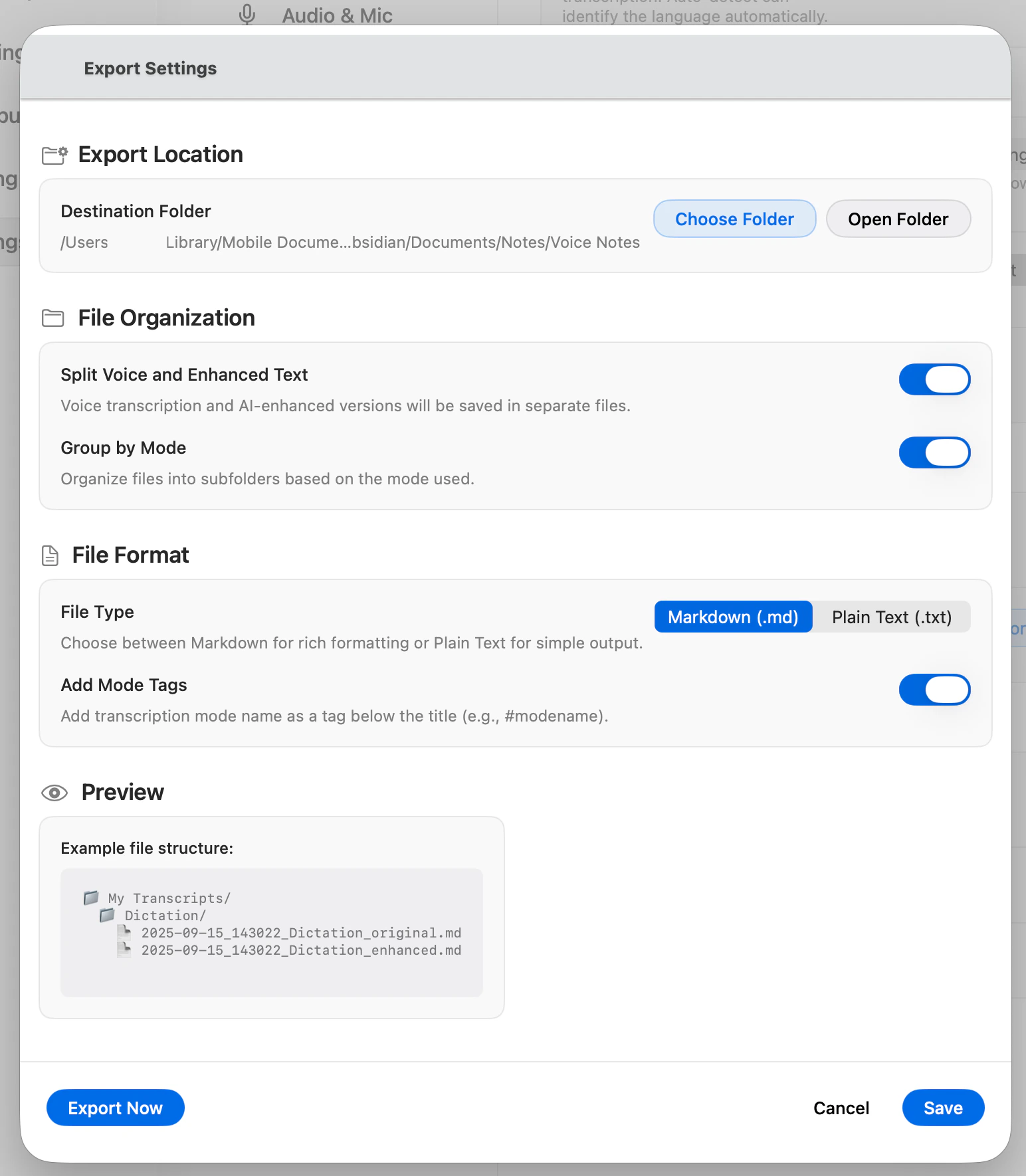
Example Folder Layout
With Group by Mode enabled, your export folder can look like this:Export Older Transcripts
In Settings → General → Local Files, click Export now to export transcripts you already recorded before turning this on.What To Expect
- New transcripts are saved automatically after recording finishes.
- Files are saved as the format you selected: .md or .txt.
- If Group by Mode is enabled, each mode is saved in its own folder.
- If you edit a transcript later in Utter, exported files are updated to match.
If Files Do Not Appear
- Confirm Automatically export transcriptions is enabled.
- Confirm the export folder is still accessible.
- Click Export now to force a sync.