

iOS Shortcuts
Use iOS Shortcuts to start or stop recording without opening Utter.Fastest setup: use this ready-made shortcut
- Press once to start recording.
- Press the same button or trigger again to stop recording.
- The transcript is copied to your clipboard automatically.
- You do not need to open Utter or the Shortcuts app.
Available Utter Shortcut Actions
macOS Completion Commands
On macOS, each mode can run a completion command after transcription finishes. Use completion commands when you want Utter to send the final transcript to another app or script automatically. For example, you can append each finished dictation to your Obsidian daily note with the Obsidian CLI.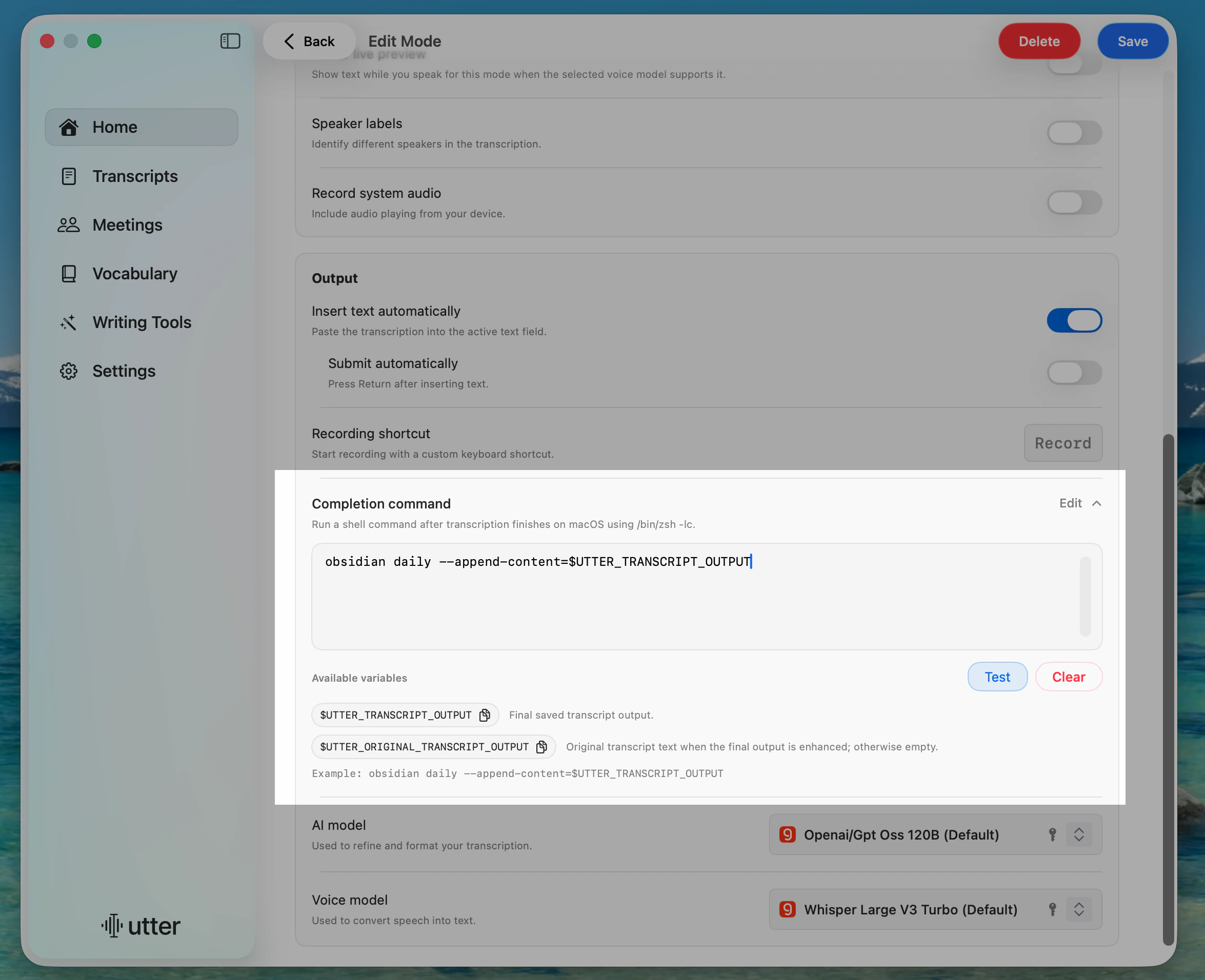
Add a Completion Command
1
Open Home
In Utter, go to Home.
2
Edit a Mode
Select the mode you want to automate.
3
Open Completion Command
In Output, open Completion command and click Edit.
4
Enter a Command
Add the shell command you want Utter to run after transcription.
5
Test and Save
Click Test, then click Save.
/bin/zsh -lc.
Available Variables
Use these variables in your command:Example: Append to Obsidian
Dictation Controls
Control recording with these URLs:Mode Switching
Switch to a specific mode:Voice to Text becomes voice-to-text):
Usage Examples
Terminal
Shortcuts.app
1
Add Open URLs Action
Add an Open URLs action.
2
Enter Utter URL
Enter a Utter URL (for example,
utter://dictation/start).3
Run Shortcut
Run the shortcut to trigger Utter.
Raycast / Alfred
Create a script or workflow that opens the URL. Test mode switching on its own before combining it with a recording trigger:Keyboard Maestro
Use the Open URL action with any Utter deep link to trigger it from a macro.Test One Action at a Time
1
Check Recording in Utter
Record and stop a short sentence directly in the app. If this fails, fix permissions before testing automation.
2
Test the Trigger
Run only the start or toggle action and confirm Utter shows that recording has begun. Then stop it and check the saved transcript.
3
Add Output Automation
Add clipboard or completion-command actions only after recording works. Use a non-sensitive test sentence and check the destination receives it once.
eval or treat dictated text as executable shell code.
Starting a recording and receiving its finished transcript are different events. A start URL does not itself return transcript text; use the supplied Shortcut workflow or a completion command for the output stage.